AI Coding Agents: Best Tools and Security
AI coding agents compared: Claude Code, Codex, Cursor and GitHub Copilot, with sandboxing, approval modes, data retention and advisories from official docs.

Direct answer: AI coding agents are tools that read a codebase, edit files, run commands, and open pull requests on a developer's behalf. This guide compares four of them, Claude Code, OpenAI Codex, Cursor, and GitHub Copilot cloud agent, on security criteria: sandboxing, approval modes, data retention, and published advisories, using official documentation only. To add one security layer across all four, see how NeuralTrust secures AI coding assistants.
TL;DR
- AI coding agents can read code, change files, run commands, and push changes, so their permission model matters as much as their features.
- The four agents reviewed here take different approaches: Claude Code, Codex, and Cursor combine permission or approval modes with an optional or default sandbox for commands, and Copilot cloud agent works on its own branch and needs human review before merging.
- Network access is restricted by default in Codex (off), Cursor (limited destinations), and Copilot cloud agent (firewall).
- Data retention differs by vendor, plan, and settings, and each vendor documents it in a different place.
- Claude Code, Codex, and Cursor all have published security advisories in their GitHub repositories, including sandbox and workspace-boundary issues, so keeping versions current is part of securing them.
- Native controls are the first layer; NeuralTrust adds a cross-tool layer for hidden-instruction detection, MCP access control, data loss prevention, and audit logging.
1. Quick answer: top picks by use case
There is no single best AI coding agent. The right choice depends on where your developers work and which controls your security team needs. Based on the official documentation reviewed:
- Terminal-first teams that want granular permission modes: Claude Code, with Auto, Manual, and Accept Edits modes plus an optional Bash sandbox.
- Teams that want sandboxing and no network by default: OpenAI Codex, whose CLI and IDE extension use an OS-enforced sandbox with network access off by default.
- IDE-first teams: Cursor, whose agent security page says terminal commands and each MCP tool call need approval by default; its Run Modes page recommends Auto-review.
- Teams whose work lives in GitHub issues and pull requests: GitHub Copilot cloud agent, which pushes only to its own branch and cannot approve or merge its pull requests.
For head-to-head performance comparisons, see NeuralTrust's Codex vs Claude Code and Cursor vs Codex benchmarks. This guide focuses on security controls instead.
2. How we chose (security criteria)
Methodology: We selected AI coding agents that (1) can edit files, run commands, or push code with some autonomy, (2) come from a major vendor, and (3) publish security documentation covering permissions and sandboxing. All facts come from each vendor's official documentation and GitHub security advisory pages, reviewed on November 19, 2026. We did not run hands-on tests, and we do not score or rank the tools. Tools are listed alphabetically by product name (Claude Code, Codex, Cursor, GitHub Copilot cloud agent); the order is not a ranking.
We compared each agent on five security criteria:
- Sandbox: what technically limits the agent's file system and network access.
- Approval modes: when the agent must stop and ask a human before acting.
- Data retention: what the vendor documents about storing prompts, sessions, and code.
- Published advisories: security advisories in the vendor's public GitHub repository.
- Enterprise controls: managed settings, audit logs, and telemetry for security teams.
3. The tools
1. Claude Code
Vendor: Anthropic. A coding agent that runs in the terminal and VS Code, with cloud sessions available.
Key features, according to Anthropic's Claude Code security documentation:
- Permission modes: Auto mode, where a separate classifier model reviews actions and blocks those it judges unsafe; Manual mode, which starts read-only and asks before editing files or running commands; and Accept Edits mode, which auto-approves file edits and a fixed set of filesystem commands inside the working directory.
- Sandboxed Bash tool: filesystem and network isolation for Bash commands, configured with
/sandbox. - Prompt-injection safeguards: network commands such as
curlandwgetare not auto-approved by default, and unmatched commands require approval in Manual mode. - Cloud execution: each cloud session runs in an isolated, Anthropic-managed virtual machine with network access limited by default; GitHub credentials never enter the session VM.
- Team controls: managed settings, OpenTelemetry metrics, and
ConfigChangehooks to audit or block settings changes.
Security notes: In Manual mode, Claude Code asks before its file tools read or write outside the working folder, but Anthropic notes that an approved Bash command can still write anywhere your user account can unless sandboxing is on. Under commercial terms, the standard retention period is 30 days, zero data retention is available to qualified Enterprise accounts, and local transcripts are kept for 30 days by default (data usage). Recent advisories include GHSA-5xjx-9qx6-jcrv, a race condition in the Edit tool that allowed file writes outside the workspace, fixed in version 2.1.251 (Claude Code advisories).
Secure it with NeuralTrust: add hidden-instruction detection, MCP access control, and data loss prevention on top of Claude Code's permission modes, with a single audit trail across teams.
2. OpenAI Codex
Vendor: OpenAI. A coding agent available in the ChatGPT desktop app, a CLI, an IDE extension, and the cloud.
Key features, according to OpenAI's agent approvals and security documentation:
- OS-enforced sandbox: locally, the CLI and IDE extension default to no network access and write permissions limited to the active workspace.
- Sandbox modes:
read-only,workspace-write, anddanger-full-access, which OpenAI says to use with caution. - Approval policies:
on-request,never, and a granular policy that keeps specific prompt categories interactive; the Auto preset combinesworkspace-writewithon-request. - Auto-review: eligible approval requests can be routed to a reviewer agent before Codex runs the action.
- Network policy: when network access is enabled, an optional network proxy enforces allowlist-first domain rules and blocks local and private destinations by default.
- Protected paths: inside writable roots,
.git,.codex,.agents, and.awsfolders are read-only.
Security notes: Destructive app or MCP tool calls always require approval when the tool advertises a destructive annotation. For data, OpenAI points users to local history settings (history.persistence) to control session transcripts saved under CODEX_HOME, and references zero data retention as a data control. The repository lists advisory GHSA-w5fx-fh39-j5rw (CVE-2025-59532), a sandbox bypass due to a bug in path configuration logic, fixed in CLI 0.39.0 and IDE extension 0.4.12 (Codex advisories).
Secure it with NeuralTrust: keep Codex's sandbox and approvals, and add NeuralTrust to mask secrets and proprietary code before they leave your environment and to log every prompt and tool call.
3. Cursor
Vendor: Cursor. A code editor with built-in agents.
Key features, according to Cursor's agent security documentation:
- File access: reading files and searching code don't require approval;
.cursorignoreblocks agent access to specific files. - Edits: agents can modify workspace files without approval, except configuration files.
- Terminal commands: Cursor's agent security page says terminal commands need approval by default; its Run Modes page recommends Auto-review, which runs allowlisted calls immediately, runs other shell commands in the sandbox when possible and sends the rest to a classifier. Cursor describes Run Modes as best-effort guardrails rather than a hard security boundary.
- Sandbox: supported terminal commands can run in a sandbox that limits file writes to approved paths and limits network access to allowlisted domains by default; commands that need full access run outside it and ask for approval.
- MCP: every MCP connection needs approval, and each tool call still needs individual approval unless pre-approved in an allowlist.
- Network: with default settings, Cursor's tools only make network requests to GitHub, direct link retrieval, and web search providers.
Security notes: Workspace trust is disabled by default, and Cursor recommends a basic text editor for untrusted repositories. Privacy Mode, available on free and Pro plans, means Cursor will not train on your data (Cursor security). Cursor's advisories include GHSA-3p48-7v9f-v5cw (CVE-2026-50548), a critical desktop sandbox escape via an agent-controlled working directory, fixed in version 3.0 (Cursor advisory). For a deeper look, read Cursor Security Risks and the Expanding Attack Surface of AI-Driven Development.
Secure it with NeuralTrust: control which MCP servers Cursor can reach per team, and catch hidden instructions in web pages, documents, or tool results before they reach the model.
4. GitHub Copilot cloud agent
Vendor: GitHub. An autonomous agent that works on issues and pull requests in your repositories.
Key features, according to GitHub's risks and mitigations documentation:
- Who can trigger it: only users with write access; comments from users without write access are never presented to the agent.
- Where it can push: a single branch, usually a new
copilot/branch, subject to branch protections and required checks. - Human review: its draft pull requests must be reviewed and merged by a human, and it cannot approve or merge them.
- Built-in checks: CodeQL, dependency checks against the GitHub Advisory Database, and secret scanning on the code it generates.
- Containment: internet access is restricted by a firewall, and hidden characters, such as HTML comments, are filtered from user input.
- Auditability: signed commits, session logs, and audit log events for administrators.
Security notes: GitHub Actions workflows do not run on its pull requests until a user with write access approves them, unless you configure otherwise. Cloud sessions using GitHub Actions run in an ephemeral environment that is destroyed when the session ends, while the session log remains on GitHub.com; Actions-based sessions are shared by default and visible to people with repository access, while sandbox sessions are unshared by default (session data). No advisories specific to the cloud agent are cited in this guide.
Secure it with NeuralTrust: extend Copilot's repository-level controls with data loss prevention for prompts and tool calls, and a single audit trail alongside your other coding agents.
4. Comparison table
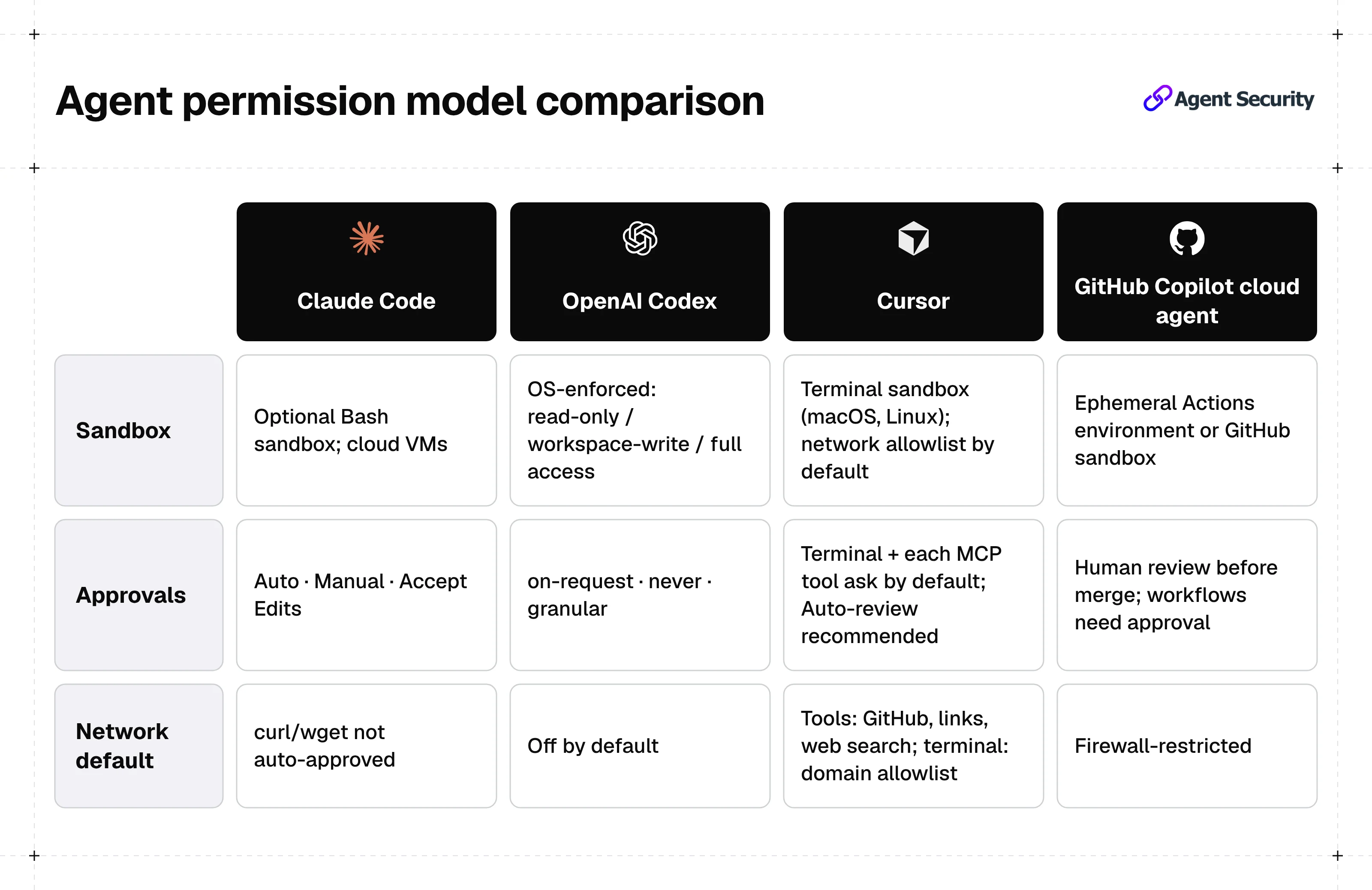
| Agent | Vendor | Sandbox | Approval modes | Data retention | Advisories (source) |
|---|---|---|---|---|---|
| Claude Code | Anthropic | Optional Bash sandbox with filesystem and network isolation; isolated VMs for cloud sessions | Auto, Manual, Accept Edits; allow and deny rules | Commercial: 30 days standard, ZDR for qualified Enterprise; local transcripts 30 days by default | GHSA-5xjx-9qx6-jcrv and others (GitHub) |
| OpenAI Codex | OpenAI | OS-enforced local sandbox; read-only, workspace-write, danger-full-access; network off by default | on-request, never, granular; optional Auto-review | Local transcripts under CODEX_HOME, configurable; ZDR referenced as a data control | GHSA-w5fx-fh39-j5rw (GitHub) |
| Cursor | Cursor | Terminal sandbox for shell commands (macOS, Linux); sandboxed network limited by default to an allowlist (sandbox.json plus Cursor's built-in domains) | Agent security page: terminal commands need approval by default; Run Modes page recommends Auto-review; per-tool MCP approval | Privacy Mode: no training on your data | GHSA-3p48-7v9f-v5cw (GitHub) |
| GitHub Copilot cloud agent | GitHub | Ephemeral GitHub Actions environment (or a GitHub-hosted sandbox); internet restricted by firewall | Human review of draft pull requests; workflow runs need approval | Session logs remain on GitHub.com after the environment is destroyed | None cited here |
Want one policy layer across every agent in this table? Start free with NeuralTrust and add guardrails to the coding agents your teams already use.
5. How to secure these tools with NeuralTrust
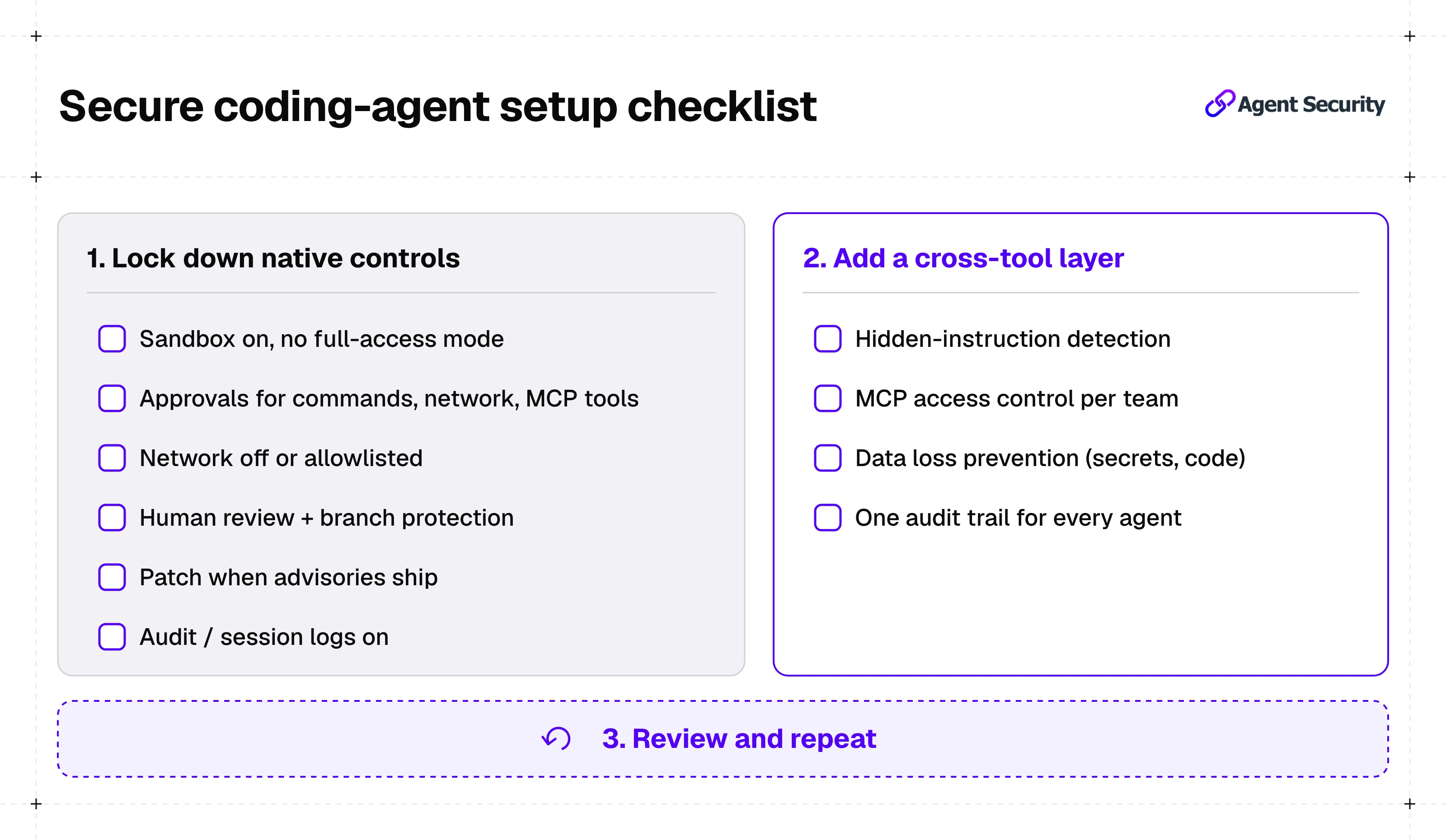
1. Lock down each agent's native controls
Start with what each vendor provides, as documented above:
- Keep sandboxing on, and avoid modes such as
danger-full-accessoutside a container you trust. - Require approval for terminal commands, network access, and MCP tool calls.
- Keep network access off or limited to an allowlist.
- Keep agent changes behind human review and branch protections.
- Update to patched versions when advisories are published.
- Turn on audit logs, session logs, or OpenTelemetry where available.
2. Add a cross-tool security layer
Native controls differ by tool, and each one covers only its own agent. NeuralTrust's secure coding assistants solution gives security teams visibility and control across Claude Code, Codex, Cursor, and GitHub Copilot:
- Hidden-instruction detection: catches instructions hidden in web pages, documents, tool results, or MCP server descriptions before they reach the model.
- MCP access control: approves allowed tools and servers, blocks the rest, and applies different rules for different teams.
- Data loss prevention: masks API keys, credentials, and proprietary code before they leave your environment.
- Audit trail: logs every prompt, tool call, and response.
3. Review and repeat
Revisit approval settings, allowlists, and versions as vendors ship new modes and publish new advisories. For more on how agents are evaluated, see our Benchmarks hub.
Frequently asked questions
What are the best AI coding agents?
There is no single best option. Four AI coding agents with public security documentation are Claude Code, OpenAI Codex, Cursor, and GitHub Copilot cloud agent. The right choice depends on whether your team works in the terminal, the IDE, or GitHub, and on which sandbox and approval controls you need.
What security risks do AI coding agents introduce?
AI coding agents can read code, edit files, run commands, and reach networks and tools, so prompt injection, leaked secrets or code, and actions outside the intended workspace are the main risks. Vendors have published advisories for issues such as sandbox escapes and file writes outside the workspace.
How do you secure AI coding agents?
Keep each agent's sandbox on, require approval for commands, network access, and MCP tools, keep changes behind human review, update to patched versions, and turn on logging. A cross-tool layer such as NeuralTrust adds hidden-instruction detection, MCP access control, data loss prevention, and a single audit trail.
Are there free options?
Some options have free access. Cursor's security page refers to free and Pro plans, and OpenAI publishes the Codex CLI source code in a public GitHub repository. Plans and usage limits change often, so check each vendor's pricing page before you choose.
Sources
- Anthropic, Claude Code security
- Anthropic, Claude Code data usage
- Anthropic, Claude Code security advisories
- OpenAI, Agent approvals and security
- OpenAI, Codex security advisories
- Cursor, Agent security
- Cursor, Security
- Cursor, Run Modes
- GitHub, Risks and mitigations for Copilot cloud agent
- GitHub, About Copilot session data