What Is an MCP Gateway?
What an MCP gateway is, where it sits between AI agents and MCP servers, what it does and does not do, and the questions to ask when you evaluate one.

Direct answer: An MCP gateway is a control point that sits between AI agents (MCP clients) and the MCP servers that expose tools and data to them. It authenticates both sides, decides which tools each agent may call and with what scope, inspects tool definitions and responses, and records every call, so tool access can be governed in one place.
TL;DR
- An MCP gateway is a single, policy-aware intermediary between AI agents and the MCP servers they use.
- Without one, every client-server pair is its own trust decision, which becomes hard to govern when dozens of agents share hundreds of tools.
- Its core jobs are to authenticate, authorize tool access per agent, govern the tool catalog, inspect tool definitions and responses, and make and record a decision for each call.
- Common deployment patterns are a centralized gateway, a per-workload or sidecar gateway, and enforcement embedded in the agent host; combining them is common.
- A gateway is one layer, not the whole defense: it does not fix insecure server code, replace permissions at the source, or govern model traffic.
- Evaluate one with questions about your own environment, tested in a short pilot, rather than by comparing feature lists.
Why MCP gateways exist
The Model Context Protocol (MCP) standardizes how AI applications connect to tools, data, and prompts.
- The benefit: integrations become easier.
- The side effect: an organization can quickly end up with many agents talking to many servers, each with its own credentials and permissions.
- The response: an MCP gateway is the architectural answer to that sprawl.
This entry covers:
- How MCP connections work without a gateway.
- Where a gateway sits and how it is deployed.
- What it does, and what it does not do.
- How it compares with related components.
- Which questions to ask when you evaluate one.

How MCP connections work without a gateway
1. The building blocks
In MCP, a host application (for example, an IDE or an agent runtime) runs one or more MCP clients. Each client connects to an MCP server, which exposes capabilities such as:
- Tools: functions the model can call.
- Resources: data the model can read.
- Prompts: reusable templates.
Remote servers usually communicate over HTTP; local servers often run on the same machine over standard input/output (stdio).
2. Why this gets hard to govern
Without a gateway, every client-server pair is its own trust decision:
- Each agent holds its own credentials.
- Each server decides on its own what to allow.
- Logs, if they exist, are scattered across hosts and servers.
That model works for one developer with a handful of servers. It becomes hard to govern when dozens of agents share hundreds of tools.
Where an MCP gateway sits
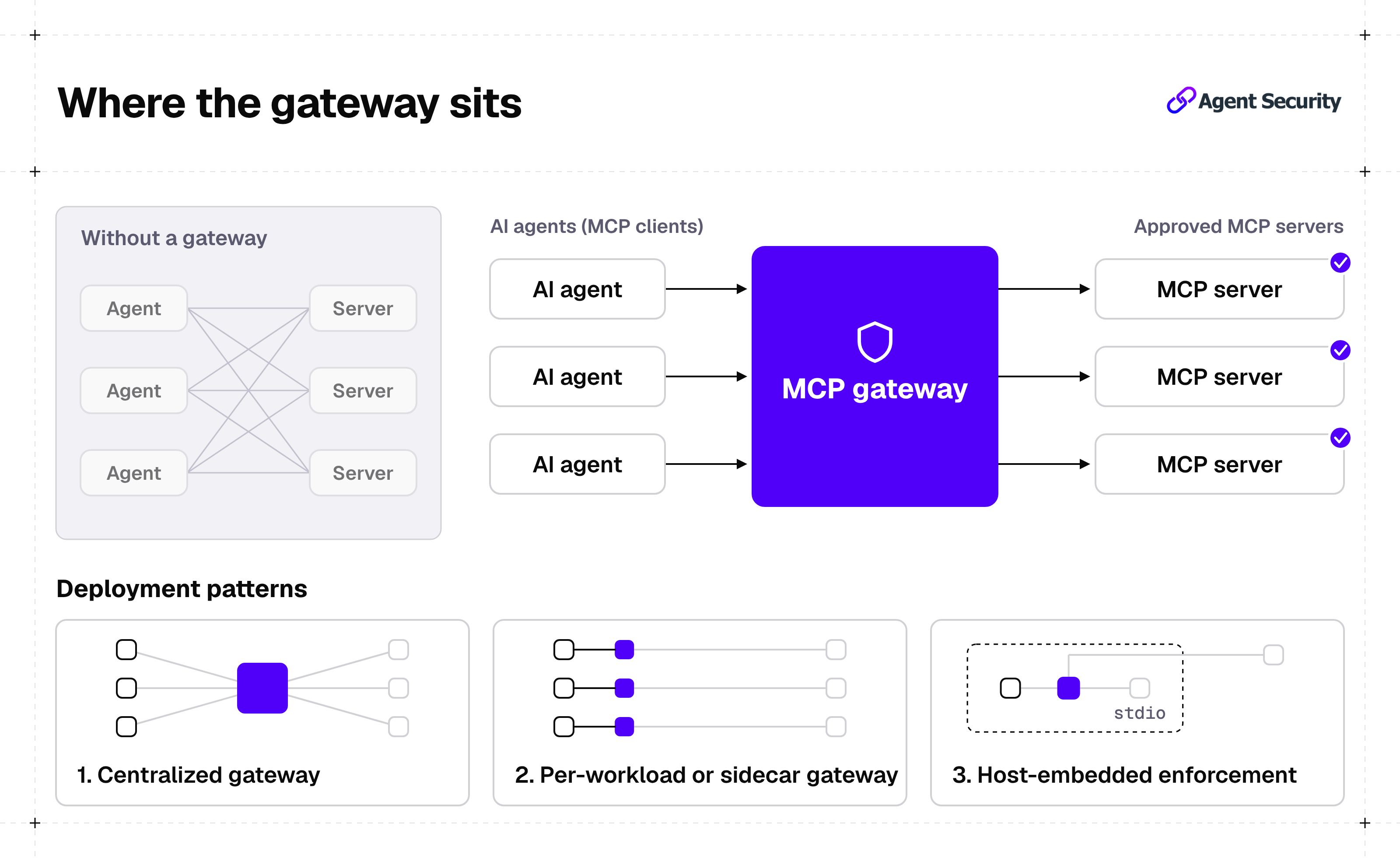
An MCP gateway places a single, policy-aware intermediary in the path between clients and servers:
- Agents connect to the gateway.
- The gateway connects to the approved servers on their behalf.
Common deployment patterns include the three below. The right pattern depends on where agents run and which servers they use, and combining patterns is common.
1. Centralized gateway
One shared service, often next to the identity provider, that all agents use for remote MCP traffic.
2. Per-workload or sidecar gateway
A gateway instance deployed next to each agent or service, which keeps enforcement close to the workload.
3. Host-embedded enforcement
Policy checks built into the agent host or harness itself, which can also cover local stdio servers that never touch the network.
What an MCP gateway does
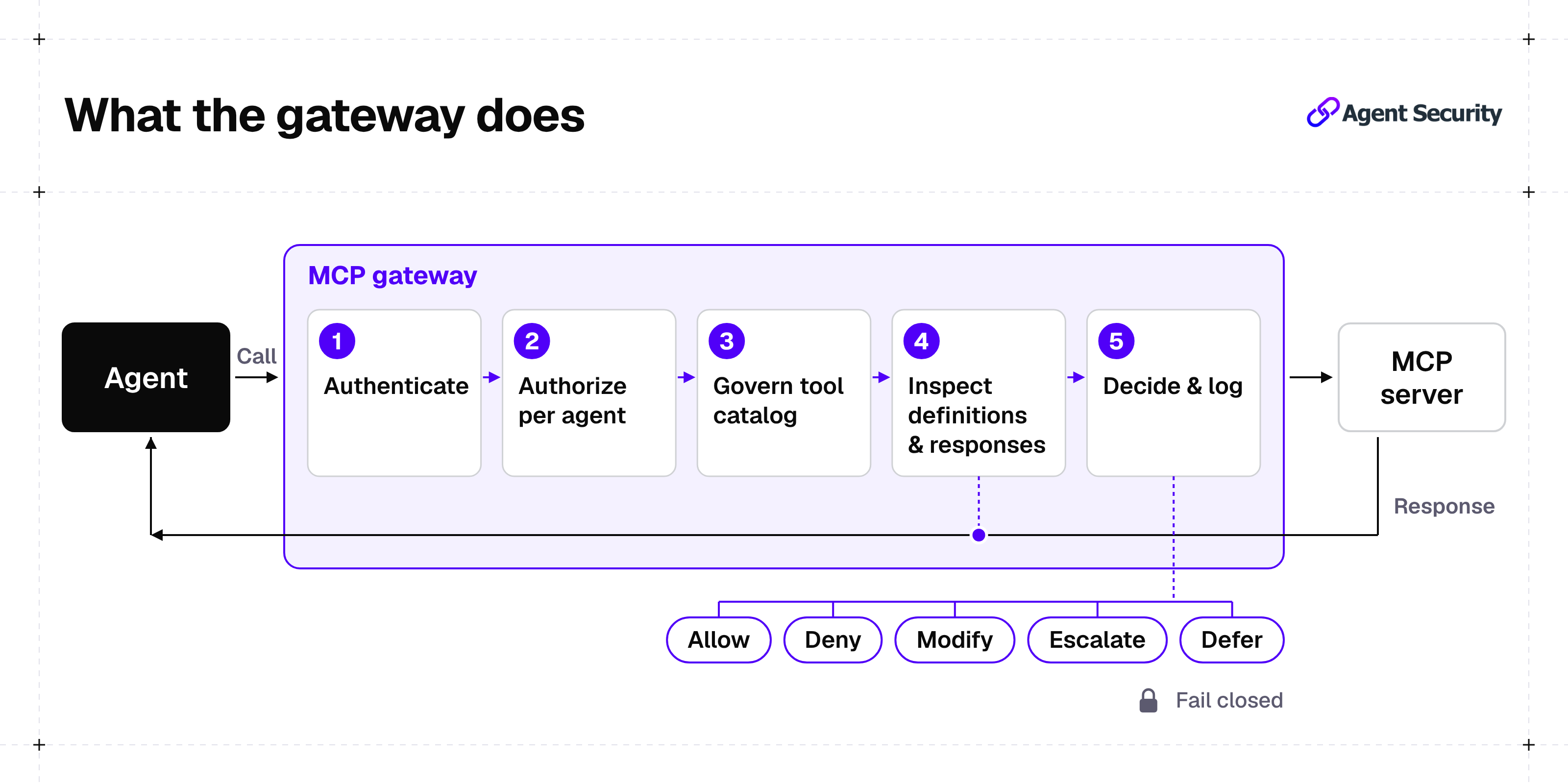
1. Authenticates agents and servers
The gateway verifies:
- Who is calling: which agent, on behalf of which user.
- Which server is being called.
Two parts of the MCP project matter here:
- The MCP authorization specification is based on OAuth for HTTP transports.
- The project's security best practices explicitly forbid token passthrough, where a server accepts tokens that were not issued for it.
A gateway is a natural place to enforce that each token is issued for, and accepted only by, its intended server.
2. Authorizes tool access per agent
Instead of giving every agent every tool a server exposes, the gateway can allow:
- Specific tools.
- Specific operations.
- Specific parameters.
These rules can apply per agent, per user, or per task. This is where least privilege becomes enforceable for tool use. See The Rise of Agent IAM for the identity patterns behind this.
3. Governs the tool catalog
The OWASP Securing Agentic Applications V2 guide recommends:
- Keeping an internal, vetted registry of approved tools and MCP servers.
- Blocking direct pulls from public repositories in production.
- Pinning tool descriptions and schemas by cryptographic hash, so that a changed definition (a "rug pull") is blocked until it is re-approved.
A gateway can apply those rules at connection time:
- Unknown servers are refused.
- Changed tool definitions are held for review.
4. Inspects tool definitions and responses
Tool descriptions and tool outputs both reach the model's context, so both can carry hidden instructions. The same OWASP guide recommends:
- Treating tool descriptions and responses as adversarial input.
- Validating responses against the approved schema before they enter the model's context.
A gateway in the data path can apply those checks consistently across servers.
5. Makes and records decisions
For each intercepted call, enforcement logic returns a decision. OWASP's guide describes five dispositions for enforcement points:
- Allow.
- Deny.
- Modify, for example, redacting a field.
- Escalate to a human.
- Defer.
The guide also states that when a decision cannot be made, the action must fail closed. Every decision, with its context, should be logged so that incidents can be reconstructed later. See Agent Forensics.
What an MCP gateway does not do
A gateway is one layer, not the whole defense.
- It does not fix insecure server code. Vulnerabilities inside an MCP server still need code review, dependency checks, and testing before the server is approved.
- It does not replace permissions at the source. If a server's own credentials can delete a production database, a gateway rule is the only thing standing between an agent and that action. Scope the server's credentials, too.
- It may not see local traffic. A network gateway does not see stdio servers running on a developer's laptop unless enforcement also lives in the host.
- It does not govern model traffic. Prompts and completions between the agent and the language model are a separate path, usually handled by an AI (LLM) gateway or guardrails.
MCP gateway vs. related components
| Component | Main job | How it relates to an MCP gateway |
|---|---|---|
| MCP server | Exposes tools, resources, and prompts | The gateway sits in front of it and controls who can use what |
| MCP registry | Lists available servers and their metadata | A registry says what exists; a gateway enforces what is allowed |
| AI (LLM) gateway | Mediates traffic between apps and language models | Covers model calls; an MCP gateway covers tool calls |
| API gateway | Routes and secures conventional API traffic | Similar position, but not built around MCP identities, tool schemas, or agent context |
| MCP scanner | Checks servers and tool definitions for risky patterns | Typically runs before approval and on changes; the gateway enforces at runtime |
In short:
- Registry vs. gateway: what exists vs. what is allowed.
- AI gateway vs. MCP gateway: model calls vs. tool calls.
- Scanner vs. gateway: typically checks before approval and on changes vs. enforcement at runtime.
For a broader view of tool-related risks, see Top 10 MCP Security Risks.
How to evaluate an MCP gateway
Rather than comparing products, start from the questions your environment needs answered.
1. Security and policy
- Protocol conformance: Which MCP specification versions does it support, and does it follow the authorization model and security best practices of the version you run?
- Identity: Can it tie every call to a specific agent, the user who delegated the task, and the session, using your existing identity provider?
- Granularity: Can policies target individual tools, operations, and parameters, not just whole servers?
- Catalog control: Does it support an allowlist of approved servers, version pinning, and alerts or blocks when a tool definition changes?
- Inspection: Does it inspect tool descriptions and responses, and can it validate responses against an approved schema?
- Decisions and failure modes: Which dispositions does it support (allow, deny, modify, escalate, defer), and does it fail closed when it cannot decide?
2. Coverage, audit, and operations
- Coverage: Does it cover remote servers only, or local stdio servers as well? What traffic would bypass it?
- Auditability: Are logs complete enough to reconstruct which agent called which tool, with which parameters, on whose behalf, and with what result?
- Operations: What latency and availability does it add to each tool call in your own tests, and what happens to agents if the gateway is down?
- Deployment fit: Can it run where your agents and data must stay (cloud, VPC, on-premises)?
Test these against your own agents and servers in a short pilot. The answers matter more than any feature list.
Frequently asked questions about MCP Gateways
1. What is an MCP gateway in simple terms?
An MCP gateway is a checkpoint between AI agents and the tools they use through the Model Context Protocol. It checks who is calling, decides which tools and actions are allowed, inspects what goes in and out, and keeps a record of every tool call.
2. How is an MCP gateway different from an AI gateway?
An AI gateway governs traffic to language models, while an MCP gateway governs agents' tool calls; NeuralTrust explains the differences in AI Gateway vs MCP Gateway.
3. Do I need an MCP gateway if I only use a few MCP servers?
Not always. With a few servers and one team, careful credential scoping, an allowlist, and host-level approvals may be enough. A gateway becomes more useful as the number of agents, servers, and teams grows and you need consistent policy and a single audit trail.
4. Does an MCP gateway stop prompt injection?
Not by itself. It can reduce the impact by limiting which tools an agent can call, inspecting tool descriptions and responses, and requiring approval for sensitive actions. Prompt injection still needs defenses across the whole agent, as described in How to Prevent Prompt Injections in AI Agents.
Keep learning
An MCP gateway turns tool access from many separate trust decisions into one place where policy is defined, enforced, and recorded. For the identity side of MCP, read What Is MCP Authentication.
If you want to see how tool-level controls like these work across real agents and MCP servers, you can request a NeuralTrust demo.